ReactaForm Builder
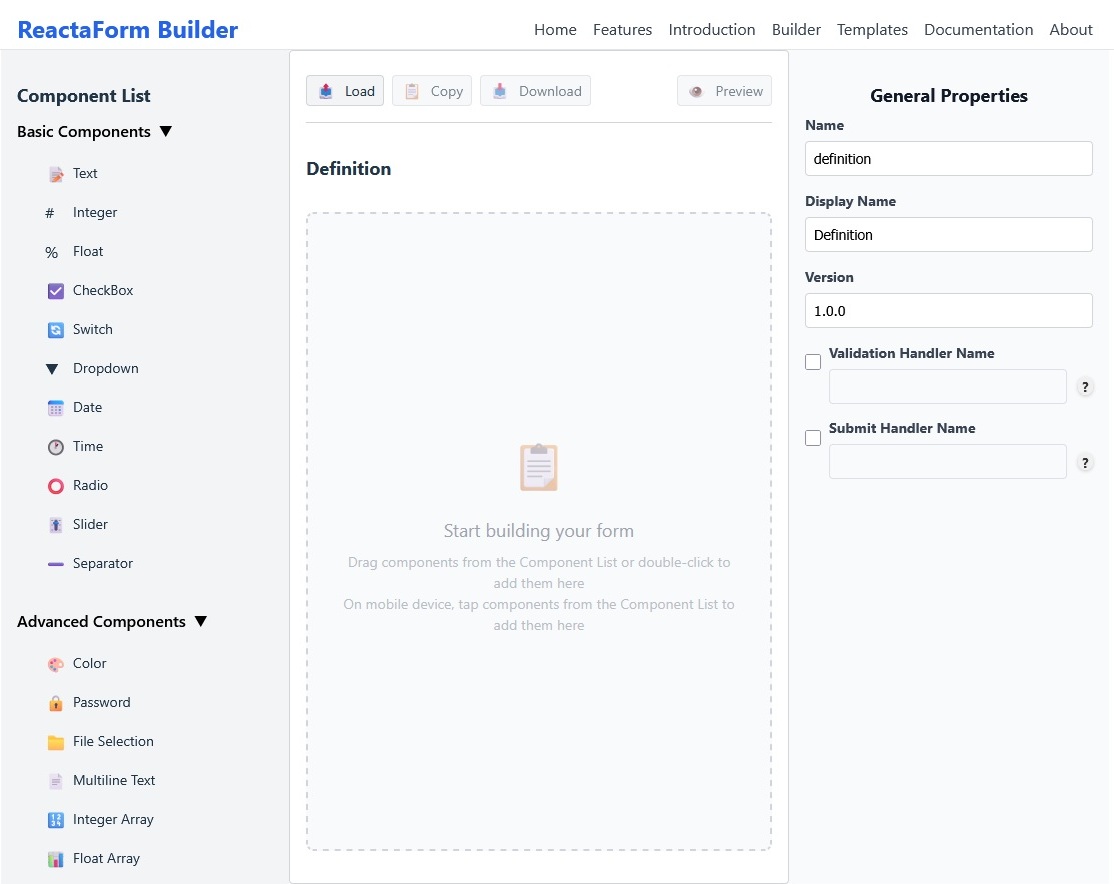
The ReactaForm Builder is a visual, drag-and-drop editor for creating and editing ReactaForm JSON definitions without hand-writing JSON. Use the Builder to assemble fields, configure properties and validation, preview behavior in real time, and export production-ready JSON.
Key Features
- Drag & Drop: Add components from the palette to the canvas; reorder fields visually and configure them via the properties panel.
- Live Preview: The canvas renders your form as you build; use the full-form preview modal to interactively test validation, conditional logic, and submission behavior.
- Export JSON: Export clean, schema-compliant JSON (.json file, clipboard copy, or preview) ready to import into your app. Exports are validated before download.
Quick Start
- Open the Builder: Open Builder
- Start from a template or create a blank form.
- Drag components from the left palette onto the canvas.
- Select a component to edit its
name,displayName, validation rules, and type-specific properties in the right panel. - Use the Preview button to test the form, then export when ready.
Builder Interface
Export & Re-import
- Download a
.jsonfile or copy the pretty-printed JSON to the clipboard. - The Builder performs schema validation before exporting and blocks export on missing required form properties or invalid configurations.
- Exported JSON can be reloaded into the Builder for iteration using the Load/Import option.
Best Practices & Tips
- Give each component a unique
name(no spaces or special chars) to avoid collisions. - Use
displayNamefor friendly labels and keepnamestable for programmatic access. - Validate conditional dependencies and option arrays in the preview before exporting.